
| 일 | 월 | 화 | 수 | 목 | 금 | 토 |
|---|---|---|---|---|---|---|
| 1 | 2 | 3 | 4 | |||
| 5 | 6 | 7 | 8 | 9 | 10 | 11 |
| 12 | 13 | 14 | 15 | 16 | 17 | 18 |
| 19 | 20 | 21 | 22 | 23 | 24 | 25 |
| 26 | 27 | 28 | 29 | 30 |
- 생명정보학
- BLaST
- 서열정렬
- 결정트리
- 자바
- 파이썬
- MERS
- HMM
- Kaggle
- AP Computer Science A
- AP
- 바이오파이썬
- 블록체인
- 바이오인포매틱스
- 이항분포
- 시그모이드
- 인공신경망
- 인공지능 수학
- 인공지능
- SVM
- ncbi
- Java
- 생물정보학
- COVID
- bioinformatics
- RNN
- 딥러닝
- CNN
- 오류역전파
- 캐글
- Today
- Total
데이터 과학
판다스로 분석하는 포켓몬 본문
캐글에서 판다스 소스를 보다가 포멧몬들의 능력치를 분석하는 자료들이 있어서 링크를 걸어 봅니다.
내용이 재미있고, 판다스를 처음 배우는 사람들에게 도움이 될 것 같습니다.
챗GPT는 포켓몬 분석을 아래와 같이 설명하고 있습니다.
# chatGPT에서의 판다스를 활용하는 포켓몬 데이터 분석
import pandas as pd
# CSV 파일을 읽어서 데이터프레임 생성
df = pd.read_csv('pokemon.csv')
# 데이터프레임의 처음 5개 행 출력
print(df.head())
# 데이터프레임의 기본 정보 출력
print(df.info())
# 특정 열(컬럼) 선택하기
selected_columns = ['Name', 'Type 1', 'Type 2', 'HP']
subset = df[selected_columns]
print(subset.head())
# 조건을 만족하는 행(로우) 선택하기
filtered_data = df[df['Type 1'] == 'Fire']
print(filtered_data.head())
# 열(컬럼)의 통계 정보 출력
print(df['Attack'].describe())
# 열(컬럼) 간의 상관관계 분석
correlation = df[['HP', 'Attack', 'Defense', 'Sp. Atk', 'Sp. Def', 'Speed']].corr()
print(correlation)
# 열(컬럼)의 평균값 계산
mean_hp = df['HP'].mean()
print("평균 HP:", mean_hp)
# 그룹별로 통계 정보 계산
grouped_data = df.groupby('Type 1')['Attack'].mean()
print(grouped_data)
이 코드 예제에서는 판다스의 다양한 기능을 사용하여 데이터프레임을 조작하고 분석합니다. 예를 들어, 처음 5개 행 출력, 기본 정보 출력, 특정 열 선택, 조건에 따른 행 선택, 열의 통계 정보 계산, 열 간의 상관관계 분석, 평균값 계산, 그룹별 통계 정보 계산 등의 작업을 수행합니다.
여기까지가 chatGPT에서의 포켓몬 분석 소스와 그에 대한 설명입니다. 일
반적이면서 단순한 내용입니디만 여러가지 판다스 함수들이 나오고 있습니다.
찾아보면 head(), describe(), corr(), mean(), groupby() 이 함수들이 나왔네요. 한번 구글에서 찾아 보도록 합시다.
캐글에서 포켓몬
아래 링크는 포켓몬들에 대한 기본적인 내용을 판다스로 분석한 내용입니다.
https://www.kaggle.com/code/ash316/learn-pandas-with-pokemons/notebook
Learn Pandas with Pokemons
Explore and run machine learning code with Kaggle Notebooks | Using data from Pokemon with stats
www.kaggle.com
입력값에 대한 소스는 다음 링크에 있습니다. (https://www.kaggle.com/code/ash316/learn-pandas-with-pokemons/input)
코딩은 주피터 노트북으로 해도 되고, 코랩으로 해도 됩니다.

import pandas as pd #importing all the important packages
import numpy as np
import matplotlib.pyplot as plt
import seaborn as sns
plt.style.use('fivethirtyeight')
df = pd.read_csv('../input/Pokemon.csv')
df.head(n=10)
# df = pd.read_csv('../input/Pokemon.csv') 이 부분은 파일 입력하는 부분인데 파일소스를 어느 폴더에 위치해서 불러오는지 정해야 합니다. 본인 컴퓨터 환경에 맞춰서 입력값 넣어야 하는데 초보자들의 실수가 많이 나타나는 곳입니다. 별 어려움은 없습니다.
df.columns = df.columns.str.upper().str.replace('_', '')
df.head()
# df.columns.str.upper().str.replace('_', '') replace라는 변환함수를 통해 컬럼의 소문자를 대문자로 변환합니다.
df[df['LEGENDARY']==True].head(5)
# 'LEGENDARY']==True 인 내용을 5개 보줍니다.
df = df.set_index('NAME')
df.index = df.index.str.replace(".*(?=Mega)", "")
df.head(10)
df=df.drop(['#'],axis=1)
print('The columns of the dataset are: ',df.columns) #show the dataframe columns
print('The shape of the dataframe is: ',df.shape)
df['TYPE 2'].fillna(df['TYPE 1'], inplace=True)
print(df.loc['Bulbasaur'])
print(df.iloc[0])
print(df.ix[0])
print(df.ix['Kakuna'])
df[((df['TYPE 1']=='Fire') | (df['TYPE 1']=='Dragon')) & ((df['TYPE 2']=='Dragon') | (df['TYPE 2']=='Fire'))].head(3)
print("MAx HP:",df['HP'].argmax())
print("Max DEFENCE:",(df['DEFENSE']).idxmax())
df.sort_values('TOTAL',ascending=False).head(3)
print('The unique pokemon types are',df['TYPE 1'].unique())
print('The number of unique types are',df['TYPE 1'].nunique())
print(df['TYPE 1'].value_counts(), '\n' ,df['TYPE 2'].value_counts())
df.groupby(['TYPE 1']).size()
(df['TYPE 1']=='Bug').sum()
df_summary = df.describe()
df_summary
여기까지가 텍스트 내용으로 분석하는 방법이며 이 다음 내용에서 그래픽으로 분석한 결과를 보여주는 내용이 있습니다.
이외에 재미있는 소스들이 있는데 실습을 한번 해 봅시다.
캐글에 링크를 따라서 실습을 한번 해 보고 다음 링크에도 좀 더 자세한 내용으로 데이터를 분석하는 소스가 있습니다.
https://www.kaggle.com/code/mmetter/pokemon-data-analysis-tutorial
Pokemon Data Analysis Tutorial
Explore and run machine learning code with Kaggle Notebooks | Using data from Pokemon- Weedle's Cave
www.kaggle.com
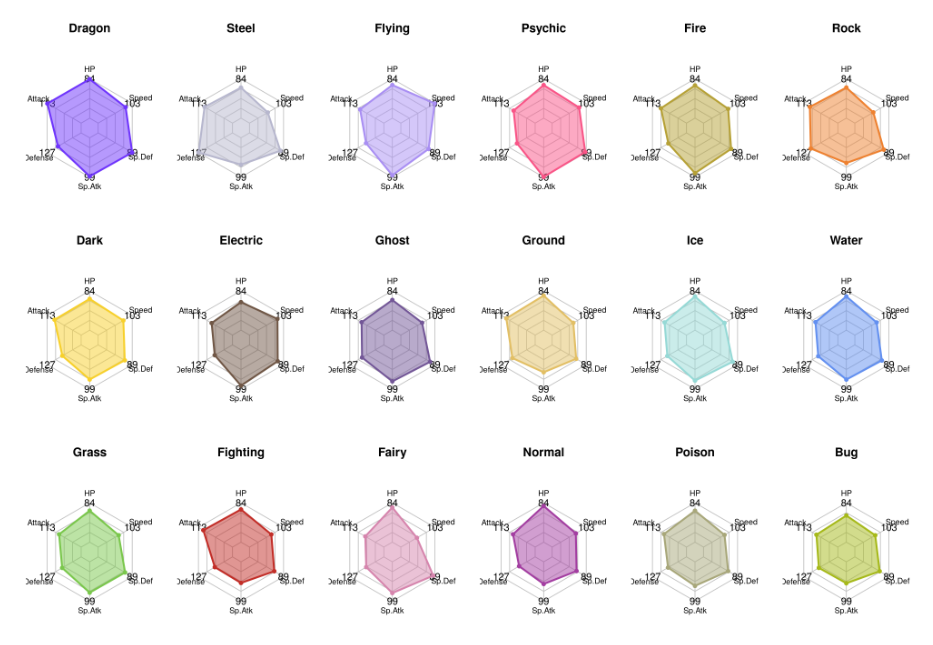
포켓몬 배틀이라는 주제로 포켓몬들의 능력치를 나타내는 소스인데 방사형 모델을 도식화하는 내용까지 있습니다.
https://www.kaggle.com/code/jonathanbouchet/pokemon-battles
Pokemon Battles
Explore and run machine learning code with Kaggle Notebooks | Using data from Pokemon- Weedle's Cave
www.kaggle.com
Data ScienceTutorial for Beginners 라는 제목의 포켓몬 데이터를 분석하는 내용이 있습니다.
판다스에 대한 내용 분량이 방대하고 학습하기에 적합한 소스입니다.
종합선물 세트라는 느낌이 있을 정도로 방대하기에 판다스를 활용한 데이터 분석 학습하는데 좋은 소스입니다.
(판다스로 초기에 데이터 분석을 하는분에게 추천하는 소스입니다)
https://www.kaggle.com/code/kanncaa1/data-sciencetutorial-for-beginners
Data ScienceTutorial for Beginners
Explore and run machine learning code with Kaggle Notebooks | Using data from Pokemon- Weedle's Cave
www.kaggle.com
위 소스에 대한 입력값 위치입니다. (https://www.kaggle.com/code/kanncaa1/data-sciencetutorial-for-beginners/input)
https://www.kaggle.com/code/mmetter/pokemon-data-analysis-tutorial
Pokemon Data Analysis Tutorial
Explore and run machine learning code with Kaggle Notebooks | Using data from Pokemon- Weedle's Cave
www.kaggle.com
'Kaggle 데이터 분석, 딥러닝' 카테고리의 다른 글
| 캐글에서의 회귀분석 (0) | 2023.05.25 |
|---|---|
| 캐글에서의 가설검정 (0) | 2023.05.23 |
| 디렉토리 관련 명령어 (0) | 2023.03.30 |
| 판다스 - 데이터프레임 (0) | 2023.03.23 |
| 판다스(PANDAS) 안내 (0) | 2023.03.22 |